


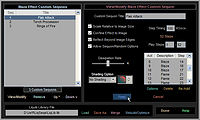
 Sequons feature has been enhanced to support
Liquib Library files that contain Sequon Options and Custom Sequons for Tools
and Effects. Functions are available to Load a different
Liquib Library, Move the file to a different directory and
Merge other files. Sample Custom Sequons for each Tool
and Effect are available when Liquib is installed, and new
Custom Sequons can be stored whenever interesting sequences are applied
that you wish to save.
Sequons feature has been enhanced to support
Liquib Library files that contain Sequon Options and Custom Sequons for Tools
and Effects. Functions are available to Load a different
Liquib Library, Move the file to a different directory and
Merge other files. Sample Custom Sequons for each Tool
and Effect are available when Liquib is installed, and new
Custom Sequons can be stored whenever interesting sequences are applied
that you wish to save. Upscale
Window now provides options to adjust the size of Upscaled
images. The Scaled Size is calculated based upon rescaling the
current image in the main window at the scale of the original source image,
Upscale
Window now provides options to adjust the size of Upscaled
images. The Scaled Size is calculated based upon rescaling the
current image in the main window at the scale of the original source image,
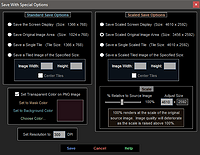 source image, optionally adjusted by a
Scaling Percentage. By default, the Scaling Percentage is
set to 100%, which would rescale at the exact resolution of the source
image. The Scaling Percentage can be adjusted from 10% (a tenth
of the original image scale) to 200% (double the original image scale).
source image, optionally adjusted by a
Scaling Percentage. By default, the Scaling Percentage is
set to 100%, which would rescale at the exact resolution of the source
image. The Scaling Percentage can be adjusted from 10% (a tenth
of the original image scale) to 200% (double the original image scale).
The Save With Special Options screen
has been redesigned to also allow adjustment of the Scaled Size when
saving Upscaled images with enhanced options.