Liquib 2.1, 2.1.1 and 2.1.2
- New Features
Liquib 2.1 was developed with a new compiler and converted to a different GUI
system. A Bloom Tool and a Cloud Effect have been added.
A new Sequons feature has been introduced, along with many other
enhancements. Read on for further details: (Also see
Liquib 2.1.1 and
Liquib 2.1.2)
- Re-engineered Code => The
Liquib program code has been converted to utilize the excellent
Ultimate++ (U++) application development framework. U++ is a versatile
set of open-source libraries and tools (BSD license), created by an international team of
brilliant developers. Further information and download links are available at
http://www.ultimatepp.org/. Liquib has also been
built with a different compiler, which should provide somewhat improved performance.
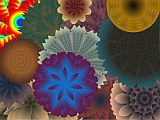
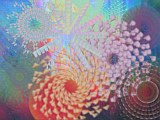
- Bloom Tool => The new Bloom
Tool radiates petals from the point where the mouse is clicked, and then duplicates them based upon mouse movements.
As the mouse is dragged downward or upward, petals
are created outward or inward respectively. Dragging the mouse right or left
rotates generated petals clockwise or counter-clockwise. Diagonal motion will
combine those two actions. The petals can be composed of varying colors or
they can be cloned from the original source image. The size, shape, number and
spacing of petals can be specified. The resulting Blooms don't much
resemble real flowers, but they can be quite interesting.
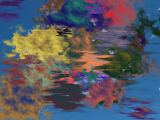
- Cloud Effect => The Cloud
Effect produces vaporous objects that can drift and swirl as if buffeted by wind
currents.
When colors and other parameters are set appropriately, their appearance can be much
like naturally occuring clouds. However, it is also quite possible to create objects
that would never be seen in the skies above planet Earth, perhaps instead resembling
cotton candy clumps, poisonous fumes or the colorful gaseous nebulae of exploded
supernovas. Each mouse click produces a single Cloud, while clicking
and dragging the mouse creates a trail of smaller Wisps. Clouds
can be specified as Cumulus or Stratus, and further refined with
Puffiness and Density parameters. The evolving action of
Clouds and Wisps is controlled by the Turbulence, which
causes rotational perturbations, and the Drift, which produces lateral
shifts
- Sequons => A Sequon performs a sequence of actions for a particular
Tool or Effect. While the general operation of each Sequon
is pre-determined, there is also typically an element of randomness, partly dependent
on how parameters are currently set. In many cases, a Sequon sequence
would be quite difficult, extremely tedious or even impossible to apply manually.
A
 button can be clicked to initiate the current default Sequon. Right-click
to show a menu of currently available Sequons and options. Sequons
can be included with Automatic Effects,
along with Random Effects and Scripted Sequences. During
Automatic Effects, Sequons are chosen randomly, using randomly selected
Sequon Options.
button can be clicked to initiate the current default Sequon. Right-click
to show a menu of currently available Sequons and options. Sequons
can be included with Automatic Effects,
along with Random Effects and Scripted Sequences. During
Automatic Effects, Sequons are chosen randomly, using randomly selected
Sequon Options.
- Reflect Beyond Image Edges =>
Many of the Liquib Tools and Effects shift image pixels to
different positions, so when a Tool/Effect is applied near the image edges,
the program often might calculate that it needs to transfer pixels from outside of the
image. In such cases, prior versions of Liquib would typically use the
currently configured Background Color to represent those pixels that were
shifted into the picture from beyond the image boundaries. With Liquib
2.1, a new Reflect Beyond Image Edges option has been added to the
Tool/Effect Options screens for those Tools and Effects.
When Reflect Beyond Image Edges is set, the program will treat the images edges
as if they were 'mirrors', and will normally pull pixels from within the image, rather
than use the Background Color. The operation of this option also depends
on the current setting of the Confine Effects To Image Area option (under the
View Menu), so it might help to experiment with different combinations of
those two settings to get a better feel for how they work together.
- Other => Many other
improvements have been made with Liquib 2.1. Here are a few that
should be mentioned:
- A new option labeled Copy and Paste into New Pool has been added to the
Pools and Edit Menus. This option will Copy the current
screen image, create a new Pool and Paste the copied image into that
Pool. The pasted image will then serve as the source image for the new
Pool.
- Liquib can now properly handle files and directories
with names encoded in alternate character sets (such as Cyrillic, Chinese, etc.)
- Liquib Effects typically consist of any number of Actions
that are initiated by mouse clicks and movements, and those Actions can then
continue to evolve by Steps until the Effect is stopped (when
Keep is pressed perhaps). With manually applied Effects, no
more that one Action can be started at each Step. It's now
possible, after an Effect has been completed, to alter the Step at which
each individual Action begins by using the Adjust function or the
Image Manipulation History
screen. For example, several Drops might be adjusted so that they occur
at the same Step, creating the appearance of them bursting into existence all
at once. (Several of the pre-defined Sequons use this technique.) The Script Editing screen can also be
used to make similar changes to Effect Actions that have been captured in
Scripts.
Liquib 2.1.1
Liquib 2.1.1 was primarily released to fix crashes that would occasionally occur
with certain Tools when the left mouse button was released outside of the
window. A few other minor tweaks were made. The free
Liquib Screensaver has
also been updated to version 2.1.1.
Liquib 2.1.2
Version 2.1.2 of Liquib corrects the positioning of certain Effect
Sequons. This
fix was also applied to the Liquib Screensaver.
Click to review Liquib 2.0
enhancements