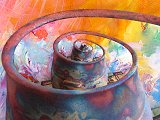
 Droste Tool => The Droste Tool can be
applied to produce self-similar pictures within pictures, ever diminishing to
infinitesimal smallness. (The word Droste derives from the name of
a Dutch company, which used the picture-within-picture concept in advertisements
for it's cocoa product.) Besides the standard Droste recursions,
several quite different variations are included that rely on related mathematical
methods.
Droste Tool => The Droste Tool can be
applied to produce self-similar pictures within pictures, ever diminishing to
infinitesimal smallness. (The word Droste derives from the name of
a Dutch company, which used the picture-within-picture concept in advertisements
for it's cocoa product.) Besides the standard Droste recursions,
several quite different variations are included that rely on related mathematical
methods.
Any image can be used as the source for Droste Tool renderings.
However, some of the most interesting Droste effects result from using an
image that has been manipulated with a graphics program to define a transparent
region (alpha channel). The transparent area can serve as a sort of frame
into which Droste recursions will be generated. An internet search
for "Droste effect" will quickly yield many spectacular examples of this
technique. The Liquib Droste Tool will detect such transparent
regions (in PNG, TIFF or PSD files), and will automatically attempt to determine
appropriate values for the X and Y Center Offsets and the Inner
Pct. These, and other parameters, can then easily be refined as desired
via the new Adjust/Recreate function (see below). If no transparent
region is available, the Droste Tool will create generic recursions based
on the Droste Style and other options.
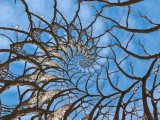
While developing the Droste Tool, I found several resources that were
particularly helpful toward understanding the necessary mathematics. I would
like to mention these websites, and express my appreciation to the people
involved: The superb article by Jos Leys on
Droste
Effect Mathematics (also some great sample images!) The
GIMP MathMap Droste script (freeware!), which I understand
was created by Ben Breic and refined by Josh Sommers, who also developed the
tutorial. The fascinating Leiden University analysis of Escher Droste techniques, which
further proves the brilliance of the Dutch artist M.C. Escher as a pioneer in the
use of mathematics to create art (and he didn't have computers to help him!).
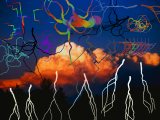 Bolt Effect => The Bolt Effect emulates
lightning bolts and other branching, streaking phenomena (most of which are quite
abstract). Each mouse click produces a single Bolt, while clicking
and dragging the mouse creates a cluster of smaller occurrences called
Sparks. Besides Lighting the Bolt Style can be set to
Fungus, Tentacles, Road Map or Curly Hair. A
Branches parameter controls the relative number of arms or splits, and thus
the resulting complexity of the objects. Bolts can be composed of
colors that shift hues or pulsate along the branches. As with other
Liquib Effects, Bolts and Sparks can remain active
after being applied, with branches and sub-levels flickering in and out of
existence.
Bolt Effect => The Bolt Effect emulates
lightning bolts and other branching, streaking phenomena (most of which are quite
abstract). Each mouse click produces a single Bolt, while clicking
and dragging the mouse creates a cluster of smaller occurrences called
Sparks. Besides Lighting the Bolt Style can be set to
Fungus, Tentacles, Road Map or Curly Hair. A
Branches parameter controls the relative number of arms or splits, and thus
the resulting complexity of the objects. Bolts can be composed of
colors that shift hues or pulsate along the branches. As with other
Liquib Effects, Bolts and Sparks can remain active
after being applied, with branches and sub-levels flickering in and out of
existence.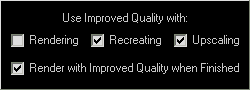 Now, using a different technique (super-sampling),
that option has been expanded to include most of the Tools, as well as the
Vortex and Melt Effects. The Options screen for each Tool/Effect provides
choices for using Improved Quality in various situations (Rendering,
Recreating and Upscaling). The Render with Improved Quality
when Finished option can be set to automatically re-render when the
Tool/Effect is finalized. A Quality button is also available
to toggle between Quality modes temporarily, Normal =
Now, using a different technique (super-sampling),
that option has been expanded to include most of the Tools, as well as the
Vortex and Melt Effects. The Options screen for each Tool/Effect provides
choices for using Improved Quality in various situations (Rendering,
Recreating and Upscaling). The Render with Improved Quality
when Finished option can be set to automatically re-render when the
Tool/Effect is finalized. A Quality button is also available
to toggle between Quality modes temporarily, Normal =  /
Improved =
/
Improved =  .
.
The difference with Improved Quality rendering is particularly noticeable
with the Stylus and Comb Tools, which had tended to appear rather
pixelated. Fortunately, with most computers, those Tools (and a few
others) can probably be rendered interactively using Improved Quality
without seeming overly sluggish.
 button or type G. This makes it easy to experiment with different parameter
variations and combinations, and quickly see the results. (This could also
be accomplished through the History
screen, which allows changes to earlier manipulations as well.)
Adjust/Recreate can be especially useful with the Droste Tool, allowing
its many parameters to be tweaked until an interesting effect is created.
button or type G. This makes it easy to experiment with different parameter
variations and combinations, and quickly see the results. (This could also
be accomplished through the History
screen, which allows changes to earlier manipulations as well.)
Adjust/Recreate can be especially useful with the Droste Tool, allowing
its many parameters to be tweaked until an interesting effect is created.