Phota 3.5
- New Features
The most notable enhancements with Phota 3.5 are listed below:
-
 The new Albums Catalog provides
a handy index and summary of your Phota albums. Options are
available to quickly open albums, browse through album pages and list album photos.
The new Albums Catalog provides
a handy index and summary of your Phota albums. Options are
available to quickly open albums, browse through album pages and list album photos.
-
 The Photo Search function has been
expanded to allow the option of searching through all cataloged albums for photos,
rather than just the currently opened album.
The Photo Search function has been
expanded to allow the option of searching through all cataloged albums for photos,
rather than just the currently opened album.
- A Save Album Text File option provides the ability to create a
text file that contains all of the photo information stored in an album. The
photo information is saved as a file with the .txt extension, in a format that can
be loaded into a Spreadsheet program (such as Microsoft Excel). The
Spreadsheet program might then be used to manipulate the data, create reports, etc.
-
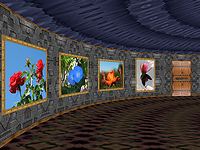 A new Rotunda variety 3D
Gallery exhibits album photos along the walls of a circular room with
a domed ceiling. Menu options are now available to rebuild the current
Gallery at any time either randomly, or in a particular style
(Rectangular, Corridor or Rotunda).
A new Rotunda variety 3D
Gallery exhibits album photos along the walls of a circular room with
a domed ceiling. Menu options are now available to rebuild the current
Gallery at any time either randomly, or in a particular style
(Rectangular, Corridor or Rotunda).
- The Audio Player
 now
includes a Random option, which plays Play Directory Audio files
and CD tracks in random sequence, rather than sequentially. A Random
Sequence option is also available in the Slide Show Configuration
screen to choose music randomly during a Slide Show.
now
includes a Random option, which plays Play Directory Audio files
and CD tracks in random sequence, rather than sequentially. A Random
Sequence option is also available in the Slide Show Configuration
screen to choose music randomly during a Slide Show.
- The controls on the Video Player
 can now be minimized to reduce distractions while
playing a Video file. The Slide Show Configuration screen provides a
choice to show or hide Video controls during a Slide Show. The 'V'
key can be pressed to toggle on/off the appearance of controls.
can now be minimized to reduce distractions while
playing a Video file. The Slide Show Configuration screen provides a
choice to show or hide Video controls during a Slide Show. The 'V'
key can be pressed to toggle on/off the appearance of controls.
- A simple change, but quite convenient: Just hit the Space bar to
Pause/Resume any current activity. This includes a Slide Show,
Audio or Video playing and Gallery Exploring.