Liquib 3.1.1
Liquib 3.1.1 includes an important fix to correct a glitch with saving JPEG
images (.jpg files). The JPEG images were always being saved with the lowest possible
Quality of 1 and looked terrible, rather than using the specified JPEG Quality between 1
and 100. When you install this new version, you might need to initially enter your
preferred JPEG Quality value when you first save a JPEG image. I apologize for the
trouble this has caused, and I'm truly embarassed that it took me so long to recognize
the problem and fix it.
Click to review Liquib 3.0
enhancements
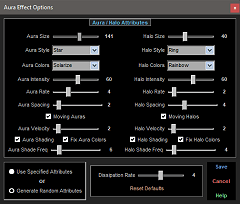 option adds alternating lightened and darkened waves around Auras and Halos
that follow their radiating colors. This tends to somewhat enhance the colors, and
makes them appear more active as the shaded bands pulse with the color shifts.
Shade Frequency can be adjusted to control the relative size and spacing of
shading bands. A Fix Colors option has also been added to prevent some of
the harsh colors that certain varieties of Auras can produce.
option adds alternating lightened and darkened waves around Auras and Halos
that follow their radiating colors. This tends to somewhat enhance the colors, and
makes them appear more active as the shaded bands pulse with the color shifts.
Shade Frequency can be adjusted to control the relative size and spacing of
shading bands. A Fix Colors option has also been added to prevent some of
the harsh colors that certain varieties of Auras can produce.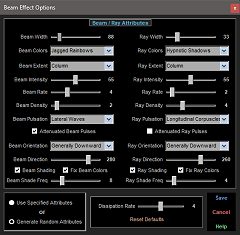 Shading option operates much as described above for Auras. Alternating
light and dark bands pulse along the Beam and Ray lengths, accentuating
their radiating colors. Shade Frequency sliders are also available to
specify the relative width and spacing of these bands. The Fix Colors
option can be set to avoid some of the more extreme colors.
Shading option operates much as described above for Auras. Alternating
light and dark bands pulse along the Beam and Ray lengths, accentuating
their radiating colors. Shade Frequency sliders are also available to
specify the relative width and spacing of these bands. The Fix Colors
option can be set to avoid some of the more extreme colors.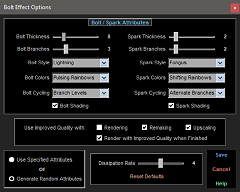 Shading option provides a sense of depth to Bolts and Sparks by
lightening their centers and darkening their edges. The rendering of Bolts
and Sparks has been improved so that the branch segments are merged together,
causing a smoother, more continuous appearance. Improved Quality options
have been added to the Bolt Effect Options screen.
Shading option provides a sense of depth to Bolts and Sparks by
lightening their centers and darkening their edges. The rendering of Bolts
and Sparks has been improved so that the branch segments are merged together,
causing a smoother, more continuous appearance. Improved Quality options
have been added to the Bolt Effect Options screen.