Liquib 2.4
- New Features
As with the recent release of Kaleider 5.2, Version 2.4 is
intended to make Liquib more usable
 with extremely high resolution displays. This had became necessary after
several customers had recently purchased new computers with very large,
high-density monitors. They complained that Liquib text and other
elements appeared so tiny that it was almost impossible to work with. The
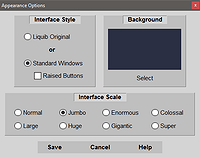
Appearance Options screen
(under the View Menu) has now been expanded to add 5 larger Interface
Scales beyond the previous maximum of Jumbo. When Liquib
is initially installed on a computer, it should automatically set a reasonable
Interface Scale based upon the resolution of the display screen.
Appearance Options can then be used to adjust according to individual preferences.
with extremely high resolution displays. This had became necessary after
several customers had recently purchased new computers with very large,
high-density monitors. They complained that Liquib text and other
elements appeared so tiny that it was almost impossible to work with. The
Appearance Options screen
(under the View Menu) has now been expanded to add 5 larger Interface
Scales beyond the previous maximum of Jumbo. When Liquib
is initially installed on a computer, it should automatically set a reasonable
Interface Scale based upon the resolution of the display screen.
Appearance Options can then be used to adjust according to individual preferences.
Numerous other fixes and improvements are included with this version, some of
them fairly important.
Click to review Liquib 2.3
enhancements