Liquib 1.6
- New Features
Version 1.6 introduces new Rumple and Clone Tools, and a new
Aura Effect. Also, a primary emphasis of Liquib 1.6 was to
improve the rendering quality of several Tools and Effects.
More details:
-
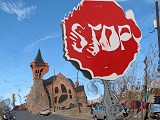 Rumple Tool => The Rumple Tool
disrupts the surface of an image, producing lumps and crevices that corrupt the
scene's appearance. The results can be fairly mild or extremely grotesque,
depending on the configured Intensity and other parameters.
Rumpling can be performed in 3 styles: Skew, Clump and
Wrinkle. Rumple Action can be either Origin to Cursor
to pull and turn the disruption area about the point of the original mouse click,
or Follow Path to produce a swath of destruction as the mouse is dragged
across an image. Optionally, Shading can be enabled to highlight
surface distortions with lightness/darkness to emphasize depth.
Rumple Tool => The Rumple Tool
disrupts the surface of an image, producing lumps and crevices that corrupt the
scene's appearance. The results can be fairly mild or extremely grotesque,
depending on the configured Intensity and other parameters.
Rumpling can be performed in 3 styles: Skew, Clump and
Wrinkle. Rumple Action can be either Origin to Cursor
to pull and turn the disruption area about the point of the original mouse click,
or Follow Path to produce a swath of destruction as the mouse is dragged
across an image. Optionally, Shading can be enabled to highlight
surface distortions with lightness/darkness to emphasize depth.
-
 Clone Tool => The Clone Tool snatches a
portion of an image where the mouse is clicked, and then replicates that cameo
picture continuously as the mouse is dragged across the display. The shape
of the Cloned segment can be Circle/Oval, Rectangle,
Diamond or Hexagon. The Keep Clone in Original
Orientation option will cause the Clone shape to remain at a consistent
angle, determined by the initial mouse click, and the enclosed image will remain
upright as it is replicated. Otherwise, both the Clone shape and the
picture will turn and re-orient as the Clones are reproduced along the path
of the mouse.
Clone Tool => The Clone Tool snatches a
portion of an image where the mouse is clicked, and then replicates that cameo
picture continuously as the mouse is dragged across the display. The shape
of the Cloned segment can be Circle/Oval, Rectangle,
Diamond or Hexagon. The Keep Clone in Original
Orientation option will cause the Clone shape to remain at a consistent
angle, determined by the initial mouse click, and the enclosed image will remain
upright as it is replicated. Otherwise, both the Clone shape and the
picture will turn and re-orient as the Clones are reproduced along the path
of the mouse.
-
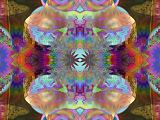 Aura Effect => The Aura Effect blends
splotches of colors with the source image upon each click of the mouse.
It is particularly useful for infusing brilliant, vibrant colors into a drab
picture. The shapes can move and rotate, and the colors shift and pulse in
cyclical patterns. Clicking and dragging the mouse creates a string of
smaller splotches called Halos. The available Aura and
Halo styles are Disk, Ring, Star and Burst.
The Color varieties are Rainbow, Rainbow Shift, Solarize,
Solarize Mix, Gleam and Rainbow Swap.
Aura Effect => The Aura Effect blends
splotches of colors with the source image upon each click of the mouse.
It is particularly useful for infusing brilliant, vibrant colors into a drab
picture. The shapes can move and rotate, and the colors shift and pulse in
cyclical patterns. Clicking and dragging the mouse creates a string of
smaller splotches called Halos. The available Aura and
Halo styles are Disk, Ring, Star and Burst.
The Color varieties are Rainbow, Rainbow Shift, Solarize,
Solarize Mix, Gleam and Rainbow Swap.
- Tool Improvements => Stylus and
Comb Tool manipulations have been refined to produce less pixelation -- still
not perfect, but noticably better. The Curl method of the Contort
Tool now creates smoother results. Spray Tool droplets are now
somewhat cleaner, especially the Crater variety. New colorized methods
have been added for both the Smear and Wipe Tools, including
Solarize, Gleam, Negate Red, Negate Green and
Negate Blue.
- Effect Quality => Drop, Wave,
Bubble, Flow and Quake Effects can now be rendered with two
levels of Quality. Normal Quality mode renders much quicker,
and is usually appropriate while effects are evolving on the screen in
real-time. Improved Quality mode renders with greater precision and
produces smoother, less ragged results. The Options screen for each Effect provides choices for
using Improved Quality in various situations (Rendering,
Recreating and Upscaling). Generally, unless you have a very
fast computer or don't mind sluggish performance, it's best to use Normal
Quality during the real-time Rendering process. Then set the
Render with Improved Quality when Finished option to automatically re-render
scenes when the Effect is finalized (by choosing Keep or by switching
to another Tool or Effect). A Quality button is also
available to toggle between Quality modes interactively, Normal =
 /
Improved =
/
Improved =  .
.
Click to review Liquib 1.5
enhancements